
AI Image Gen vs OpenClaw + Code
Same banner brief, two approaches: a standard image model vs OpenClaw generating code. The results tell you where AI actually adds value.
The task
I needed a banner for my X profile. Simple requirements:
- Dark background (#0a1628) matching my website
- “Where Humans and Technology Evolve Together” in clean typography
- My URL underneath
- Professional, minimal, 1500×500 pixels
Two approaches. Same brief. Let’s compare.
Approach 1: AI image generation
I gave a standard image generation model a detailed prompt:
Create a Twitter/X header banner (1500x500 pixels).

- Background: dark navy (#0a1628)
- Subtle circuit-board pattern in slightly lighter navy
- Main text: "Where Humans and Technology Evolve Together"
  - Elegant serif font, warm off-white (#e0d8c8)
- Below: "turtleand.com" in muted gold (#D4A03A)
- Thin gold divider line between text and URL
- Feel: premium, minimal, professional
The result:

Not bad at first glance. But look closer:
- The typography is uneven. Letter spacing is all over the place.
- Text is left-aligned awkwardly instead of properly centered
- The italic on “Together” feels accidental, not intentional
- The background texture is too visible and competes with the text
- The overall feel is “close but not quite.” The uncanny valley of design.
This is the core limitation of image generation for typography. The model understands what text looks like but doesn’t understand typographic rules. Kerning, baseline alignment, optical centering. These are precise crafts, not vibes.
Approach 2: OpenClaw + code
I asked OpenClaw to solve it differently. Instead of generating an image, OpenClaw wrote an HTML file:
<body style="width:1500px; height:500px; background:#0a1628">
  <div class="container">
    <div class="tagline">
      Where Humans and Technology<br>
      Evolve <em>Together</em>
    </div>
    <div class="divider"></div>
    <div class="url">turtleand.com</div>
  </div>
</body>
With CSS handling the design:
.tagline {
  font-family: 'Cinzel', serif;
  font-size: 52px;
  color: #e0d8c8;
  text-align: center;
}
.tagline em { color: #D4A03A; }
.divider {
  width: 120px;
  height: 2px;
  background: linear-gradient(90deg, transparent, #D4A03A, transparent);
}
.url {
  font-family: 'Inter', sans-serif;
  font-size: 22px;
  color: #D4A03A;
  letter-spacing: 0.15em;
}
Then OpenClaw rendered it to a 1500×500 PNG using a headless browser (Playwright):
const page = await browser.newPage();
await page.setViewportSize({ width: 1500, height: 500 });
await page.goto('file:///path/to/banner.html');
await page.screenshot({ path: 'x-banner.png' });
The result:
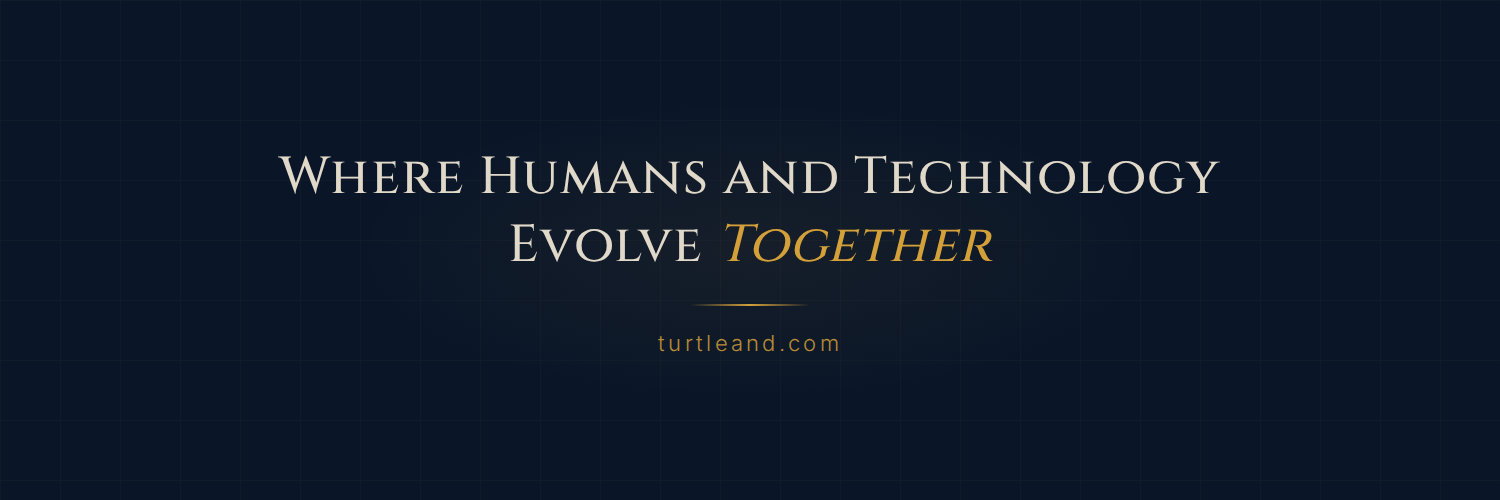
The comparison
| Aspect | AI Image Gen | OpenClaw + Code |
|---|---|---|
| Typography precision | ❌ Inconsistent | ✅ Pixel-perfect |
| Color accuracy | ~Close | ✅ Exact hex values |
| Font matching | ❌ Approximate | ✅ Exact font (Cinzel) |
| Centering/alignment | ❌ Off | ✅ CSS handles it |
| Background subtlety | ❌ Too visible | ✅ Controlled opacity |
| Time to generate | ~30 seconds | ~5 minutes |
| Iteration speed | Slow (re-prompt) | Fast (OpenClaw edits CSS, re-runs) |
| Reproducibility | ❌ Different each time | ✅ Identical every time |
The lesson
AI image generation is great for creative exploration. Concepts, mood boards, illustrations where imperfection adds character. But for anything requiring typographic precision (banners, social headers, business cards, slides), code wins.
Here’s the thing: OpenClaw wrote the code that generated the banner. AI wasn’t removed from the process. It just operated at the right layer. Instead of generating pixels directly, OpenClaw generated the instructions (HTML/CSS) that a rendering engine turned into pixels.
AI at the right abstraction level beats AI doing everything end-to-end.
This pattern keeps showing up. The best results come not from asking AI to do the whole job, but from finding the layer where it adds the most value and letting deterministic tools handle the rest.
Try it yourself
The full HTML template is about 40 lines. Swap the text, colors, and fonts for your own brand. Use any headless browser (Playwright, Puppeteer) to screenshot it. You’ll get a pixel-perfect banner in minutes.
See the result live: @turtleand_world on X
Built with OpenClaw + Playwright. OpenClaw wrote the code. The browser rendered it. I just approved it.